

The Org as an API
The Org as an API
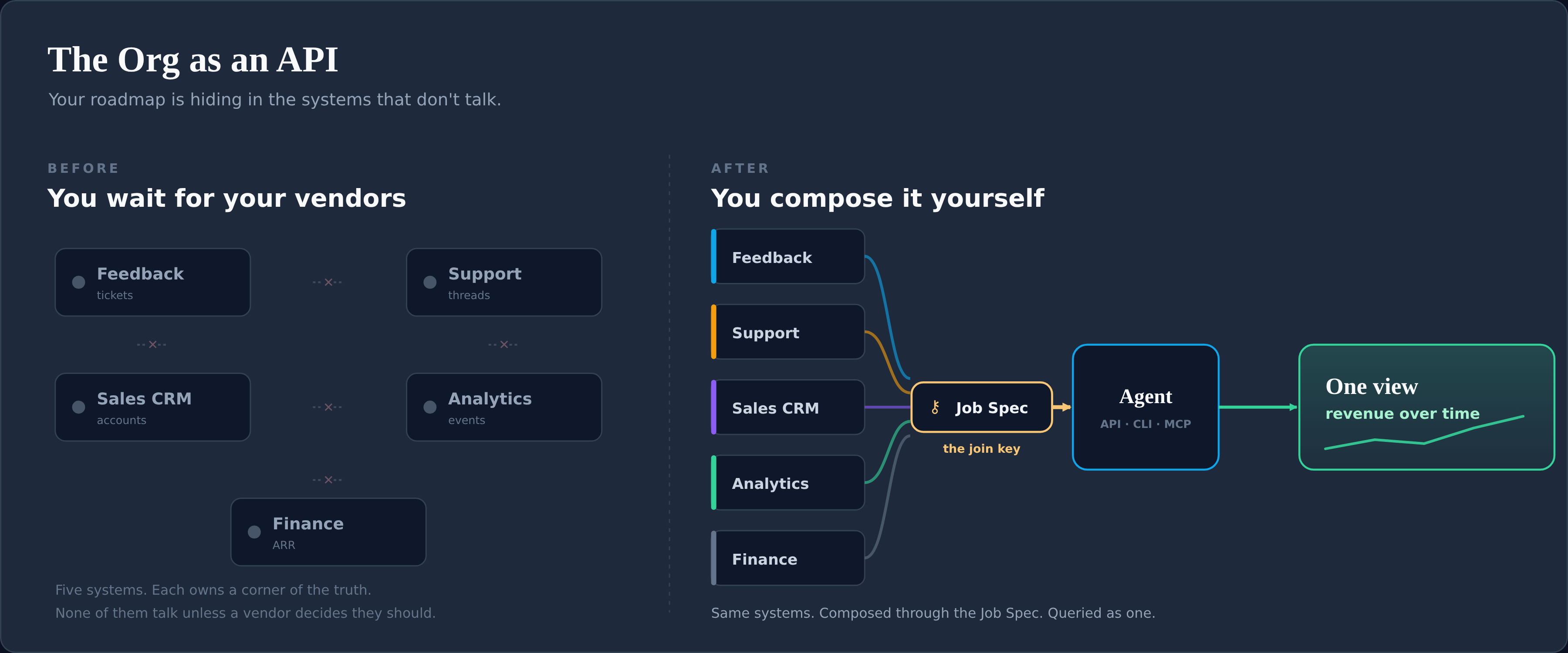
Section titled “The Org as an API”Your roadmap is hiding in the systems that don’t talk to each other. Feedback in one tool, support in another, the pipeline in the CRM, the money in finance. Each owns a corner of the truth, and for years the only integration was a person carrying numbers between tabs.
This guide is the how. It turns that manual join into a repeatable one: query every system around the job, and a year of roadmap can be ordered from evidence instead of from the loudest voice in the room.
📖 This is the operational companion to the ProductOS article “The Org as an API.” The article makes the argument; this guide is the method. Read it alongside the Job Spec (the durable unit you join around), Job Links (the join artefact), and Agentic Delivery (how the build runs once the order is set).
The core idea
Section titled “The core idea”A system you can query is a system you can reason over. If it has an API, a CLI, or exportable structured state, an agent can read it. The vendor’s integration roadmap stops being your integration roadmap.
So you stop waiting for the systems to be wired together and wire them yourself, around one unit they all share. Call it the org as an API: every function owns its system of record, and you make them answerable together.
What you need first
Section titled “What you need first”This is B2B SaaS shaped: the customer is an account, and the account is the thing every system has in common. Before you start, each system has to clear one bar.
The readiness bar: a system counts if it has an API, a CLI, or exportable structured state an agent can reason over. If it only lives in someone’s head or a screenshot, it’s not in the join yet.
The five categories, and what you join from each:
- Feedback tool — who asked, and how often. The demand signal.
- Support tool — the same problem from the complaint side. Sentiment the feedback count misses.
- CRM — the account, its value, the live opportunity, the renewal date.
- Warehouse / analytics — how the job is actually used.
- Finance — the dollars behind the renewal or expansion.
1. Decompose requests into jobs
Section titled “1. Decompose requests into jobs”A raw feature request is the wrong unit. “Add a bulk export button” is a guess at a solution wearing the costume of a requirement. Dig back to the problem, and write it down once as a Job Spec: the job, who it’s for, what “done” looks like, stated independently of any feature.
Then notice that three other requests in the backlog are the same job in different clothes. The Job Spec is the unit you cluster around. See the JTBD Guide for the decomposition discipline.
2. Establish the join keys
Section titled “2. Establish the join keys”Every system keys off something different. Feedback keys off a ticket author, support off a contact, the CRM off an account. None line up on their own.
In B2B SaaS the one thing they share is the account, so the account is what you join on. There is rarely a clean shared ID across systems, so you reconcile on account name, and fall back to email domain when a name isn’t resolved yet. Capture those identifiers per job in a Job Links file.
3. Query outward, per job
Section titled “3. Query outward, per job”Take one Job Spec and enrich it by querying each system around it:
- Which accounts have asked, across feedback and support.
- What those accounts are worth, and the opportunity type: new, renewal, or expansion.
- The renewal or close date the money is tied to.
- How the underlying problem trends in support sentiment.
Each answer lives in a different system. The job is the key that joins them. You stop having an opinion about the job and start having evidence. The result lands in the job’s Job Links file, which is allowed to churn while the Job Spec stays still.
4. Roll up into one view
Section titled “4. Roll up into one view”Run every job through the same join. What comes back is a single view: impact and revenue over time, per job, with the contributing accounts attached. A flow reads it well, accounts and what they’re worth on the left, the jobs sized by demand in the middle, the strategic buckets on the right.
📊 The ProductOS article renders this as a revenue-to-roadmap Sankey. The shape is the point: which account pulls which job, and which jobs carry the most weight.
5. Read the grounded order
Section titled “5. Read the grounded order”The roadmap order largely falls out of that view. Not because revenue picks the winners, but because the biggest, best-evidenced problems finally become visible with the stakes attached.
What floats a job to the top is the weight of the problem: how many accounts have it, how badly, how consistently across feedback and support. Revenue breaks ties and sequences against the calendar. It does not choose what matters. A loud problem with no money attached still shows up. A quiet account with a big number doesn’t jump the queue on its own.
6. From order to roadmap
Section titled “6. From order to roadmap”The view gives you a grounded starting order. It is not the finished roadmap. A human still allocates the weighted work across the engineering teams that can actually do it, against their real capacity. That mechanics lives in the capacity and allocation guide.
Identity resolution is the real work
Section titled “Identity resolution is the real work”The API existing was never the hard part. The hard part is proving this ticket author, this support contact, and this CRM account are the same customer.
Start with the heuristic above: reconcile on account name, fall back to shared domain and email. The Job Spec carries the identifiers that make most matches automatic. Where systems disagree, the agent reconciles on shared signal and flags the rest for a human rather than force-matching. Accounts seen without a profile get flagged for one, not silently dropped.
The join is only as good as that hygiene, and that hygiene is the job. How you make this layer reliable is its own guide later in the series. Don’t pretend it’s solved by a single query.
The judgement override
Section titled “The judgement override”The trap is to read all this as “optimise the roadmap for revenue.” It isn’t, and you don’t want it to be.
The org-as-an-API gets you to a defensible ordering with the evidence attached. It does not decide whether to protect a strategic account, chase a new logo, or fund a bet the data can’t yet see. A deliberate slice of capacity can and should go to jobs the revenue signal alone would under-weight: problems customers will have soon, or already have and can’t yet name. Write those up as Job Specs too, and map them to the accounts you believe hit the problem first.
Self-teaching check (dogfood this guide)
Section titled “Self-teaching check (dogfood this guide)”- Can you name the job a given request belongs to, without naming a feature?
- For your top three jobs, can you produce the contributing accounts, their value, and the dates, from a query rather than a memory?
- If someone challenges a roadmap call next quarter, can you re-run the join and answer with current data, not a recollection?
If any answer is “no,” the join isn’t wired yet. That’s the work.
Glossary
Section titled “Glossary”- The join — querying every system around one job to assemble a single evidence picture.
- Join key — the identifier that ties a record to an account. Primary: account name. Fallback: email domain.
- Grounded order — the impact-and-revenue-weighted starting order the view produces, before team allocation.
- Job Links — the per-job artefact that carries the churny join (accounts, ARR, renewals, demand). Points up to a Job Spec.
For agents
Section titled “For agents”When asked to “join the org” for a job: locate the Job Spec, read its identifiers, query each readiness-passing system around the account (name, domain fallback), and write the result to the job’s Job Links file with a captured: date. Flag unresolved matches for a human. Never force a match. Never write account or revenue data into the Job Spec itself.
Related
Section titled “Related”- Job Spec — the durable unit you join around
- Job Links — the join artefact
- JTBD Guide — decomposing requests into jobs
- Agentic Delivery — running the build once the order is set